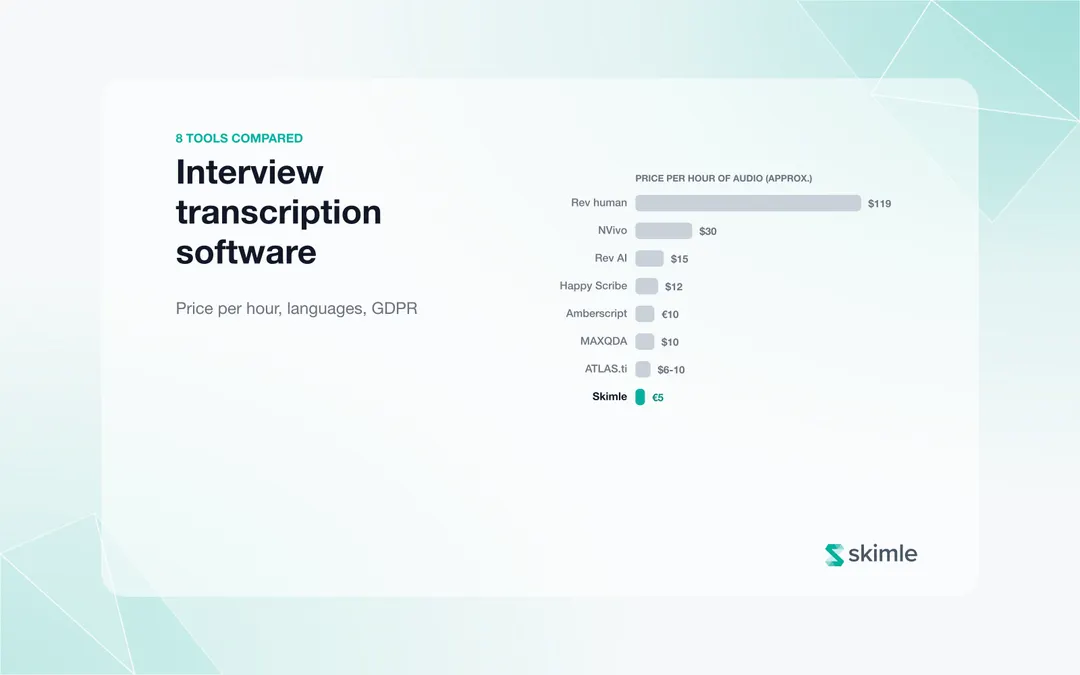
The best AI transcription tool for research depends on what you will do with the transcript. For live meeting notes, Otter.ai and Fireflies are the leading options. For free, accurate offline transcription, Whisper is the benchmark if you can set it up. For difficult audio that must be exact, Rev's human service is the quality ceiling. For interviews you will code and analyse, Skimle transcribes in 100+ languages for about €5 per hour and puts the transcript straight into analysis, with every quote playable from the recording.
Transcription quality matters more in research than in meetings. A transcript with errors corrupts your coding, speaker mistakes make quotes unattributable, and a transcript that lives in a separate app adds an export-import step to every interview. This comparison covers accuracy, speaker labels, price, languages, GDPR and what each tool means for your research workflow. If you are choosing between transcription built into NVivo, MAXQDA, ATLAS.ti or Dovetail, or EU services such as Amberscript and Happy Scribe, see our companion guide: interview transcription software for researchers, 8 tools compared.
How do the main transcription tools compare?
| Tool | Best for | Accuracy (clean audio) | Speaker diarisation | Languages | GDPR/EU hosting | Analysis integration | Pricing |
|---|---|---|---|---|---|---|---|
| Otter.ai | Meeting notes, real-time transcription | Good | Yes (basic) | English-focused | US servers | None | Free / $8.33/month (Pro) |
| Fireflies.ai | Sales and CRM workflows | Good | Yes | 60+ languages | US-based | None | Free / $10/month (Pro) |
| Whisper (OpenAI) | High-accuracy offline transcription | Very good | Not built-in | 99 languages | Self-hosted option | None | Free (open-source) |
| Rev | Legal/medical grade accuracy, difficult audio | Excellent (human) | Yes | 36+ languages | US-based | None | $0.25/min (AI), $1.99/min (human) |
| Zoom / Teams | Transcripts of online interviews you already record | Fair to good | Yes (by account name) | Major languages | Depends on your organisation's tenant | None | Included in many paid plans |
| Skimle | Research transcription + analysis in one workflow | Very good | Yes | 100+ languages | EU-hosted | Full (codes, themes, metadata, quote playback) | ~€5 / hour (one credit per minute) |
Otter.ai
Recommended reading
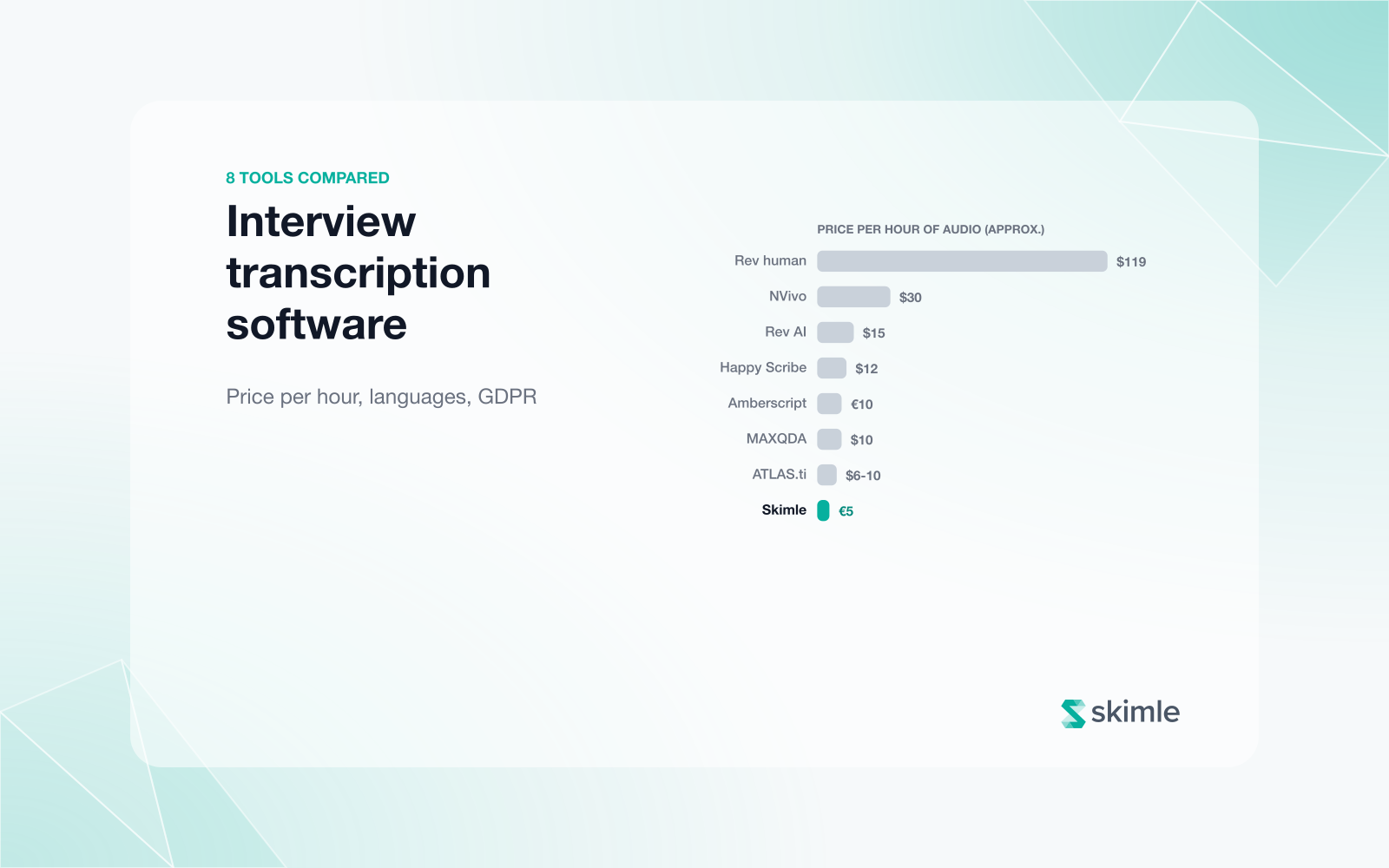
Interview transcription software for researchers in 2026: 8 tools compared (price per hour, languages, GDPR)
Otter.ai is the most widely used AI transcription tool for meetings and one-on-one conversations. Its real-time transcription, speaker identification, and integration with Zoom, Google Meet, and Teams make it useful for capturing live sessions without manual recording.
Strengths for research: Easy to set up; good for clean audio of standard English conversations; speaker labels are reasonably accurate in two-speaker settings; timestamps allow you to locate specific sections quickly.
Weaknesses for research: Accuracy drops noticeably with non-native English speakers, strong regional accents, technical terminology, or background noise. Speaker diarisation in group settings (3+ speakers) becomes unreliable. There is no REFI-QDA export or structured analysis output. Transcripts export to plain text or Word, requiring a separate import step to any analysis tool. Not designed for GDPR-sensitive data.
Pricing (2026): Free tier (300 minutes/month); Pro $8.33/month billed annually ($16.99 monthly); Business $19.99/user/month.
Best for: Meeting notes and live conversation capture where research-grade accuracy is not critical and the primary user is English-speaking.
Fireflies.ai
Fireflies positions itself as a meeting intelligence platform rather than a research transcription tool. Its core features (CRM sync, deal intelligence, sales coaching) reflect its primary use case in revenue teams.
Strengths for research: Supports more languages than Otter (60+); meeting summaries and topic tracking are useful for teams wanting to review call content without reading full transcripts; integrates with 40+ tools.
Weaknesses for research: Like Otter, it is designed for real-time meeting transcription rather than recorded research interviews. Speaker accuracy in research settings varies. The summary and action item features are optimised for commercial calls, not qualitative research synthesis. Data is stored on US-based servers, which creates complications for EU-based researchers under GDPR.
Pricing (2026): Free tier; Pro $10/user/month billed annually; Business $19/user/month; Enterprise $39/user/month.
Best for: Commercial teams capturing customer calls for CRM and coaching purposes. Not primarily designed for academic or research use.
Whisper (OpenAI)
OpenAI's Whisper is an open-source speech recognition model that consistently outperforms commercial tools on standard accuracy benchmarks. OpenAI reports a word error rate of around 2-3% on clean English audio, markedly better than most consumer transcription services.
Strengths for research: Exceptional accuracy on clean audio; supports 99 languages; open-source means you can run it locally (important for sensitive data); no per-minute cost; researchers with Python skills can configure it extensively; speaker diarisation is available via third-party integration (e.g. pyannote.audio).
Weaknesses for research: There is no consumer-facing interface: you need technical skills or someone to set it up for you. Out of the box, Whisper does not do speaker diarisation; adding it requires additional configuration. Processing is slower than cloud services for large batches. No analysis integration.
Pricing: Free to use; computing costs apply if running on cloud infrastructure.
Best for: Technically capable researchers who want maximum accuracy and don't mind a technical setup, or teams processing sensitive data who need local processing.
Rev
Rev offers both AI transcription and human transcription. Its human service is still the quality ceiling for difficult audio: heavy accents, multiple overlapping speakers, domain-specific terminology, poor recording conditions.
Strengths for research: Human transcription accuracy is unmatched for difficult recordings; turnaround times are reasonable (a 1-hour interview can be returned same-day); extensive language support for the human service; verbatim transcription options with non-verbal annotations.
Weaknesses for research: Cost is significant at $1.99/minute for human transcription: a 45-minute interview costs approximately $90 (€83). At scale, this becomes prohibitive. AI transcription at $0.25/minute is cheaper but not significantly better than other tools. No analysis integration.
Pricing (2026): AI transcription $0.25/minute; human transcription $1.99/minute (starting price).
Best for: High-stakes research where the audio is difficult and accuracy is non-negotiable: legal depositions, medical interviews, focus groups with overlapping speakers. Also useful for a small number of critical interviews where you want human reliability.
Zoom and Microsoft Teams transcripts
If you interview online, Zoom and Teams can already produce a transcript of the call, labelled with each participant's account name. It costs nothing extra on many paid plans and is ready when the call ends.
Strengths for research: no extra tool or upload; speaker names come from the call; good enough for a first read or for notes.
Weaknesses for research: accuracy is lower than dedicated engines, especially in languages other than English; speaker labels fail when several people share one device; the recording and transcript sit in your organisation's Zoom or Microsoft account, under its retention rules, which may not match your ethics approval. Most researchers use the recording file instead and transcribe it properly. See analysing Zoom and Teams call transcripts.
Best for: quick internal calls and first drafts; download the recording for anything you will quote.
Skimle
Skimle includes built-in transcription as part of an integrated research workflow: you upload audio or video, Skimle produces a speaker-labelled transcript within minutes, and analysis begins without any export-import step. The recording can stay beside the transcript, so every quote in your analysis plays back from the moment it was said.
Strengths for research: Transcription and analysis in one environment, with no workflow break between "transcript done" and "coding begins"; EU-hosted infrastructure for GDPR compliance; speaker labelling for research interviews; transcribes 100+ spoken languages and reports in 29; the transcript is immediately available in the document view for annotation; metadata on each document (participant role, interview date, segment) is available for analysis from the start. REFI-QDA export available for interoperability with NVivo, MAXQDA, and ATLAS.ti.
Weaknesses for research: Not a standalone transcription service: if you only want a transcript and will do your analysis elsewhere, Skimle is more than you need. Accuracy on heavily accented or very low-quality audio is comparable to other AI services.
Best for: Researchers who will analyse what they transcribe: qualitative research teams, academics, HR professionals doing exit interview analysis, market researchers. The value is the integrated workflow, not transcription in isolation.
See transcribing audio interviews with Skimle and the practical setup guide for interview recording and transcription for more on how the workflow functions. For researchers, see how Skimle fits academic researchers and market and customer research teams.
Which tool should you choose?
| If you are... | Best choice |
|---|---|
| An academic researcher who will analyse interview transcripts | Skimle (integrated workflow) or Whisper (technical setup, high accuracy) |
| A market researcher with a high volume of customer interviews | Skimle (scale + analysis) |
| A consultant needing quick meeting transcripts | Otter.ai or Fireflies |
| A researcher with difficult audio (accents, noise, group settings) | Rev human transcription for critical files |
| Interviewing online and needing a quick draft | Zoom or Teams transcripts, then the recording file for anything you quote |
| Already using NVivo, MAXQDA or ATLAS.ti | Their built-in transcription; see 8 research transcription tools compared |
| Working in Nordic, European or Asian languages | Test your own audio first; see our guides for Nordic, German, French, Spanish and Italian and Hindi, Vietnamese, Filipino, Indonesian and Thai interviews |
| A technical researcher handling sensitive EU data requiring local processing | Whisper |
| A HR team running exit interviews | Skimle (EU-hosted, integrated analysis, GDPR-compliant) |
What to look for in a research transcription tool
Accuracy: Test on your actual audio, not benchmark claims. Accented speakers, domain-specific terminology, and recording quality all affect real-world accuracy.
Speaker diarisation: For interviews with multiple speakers, check whether the tool reliably distinguishes who said what. Most AI tools struggle beyond 3 speakers in a room.
Language support: If you conduct research in multiple languages, verify the tool's accuracy specifically in those languages. English accuracy benchmarks don't generalise.
Data residency and GDPR: If you are in the EU or working with EU research participants, check where the tool stores and processes data. Many US-based tools process data on US servers, which creates a GDPR compliance issue for sensitive qualitative data. See how to anonymise interview transcripts for compliance.
Export format: Check what you can do with the transcript after the tool produces it. Plain text is sufficient for casual use. For qualitative research, structured export (Word, JSON, REFI-QDA) matters.
Analysis integration: For researchers who code qualitative data, the transcript is the input to analysis, not the end product. A tool that requires you to export and re-import adds friction.
Dictated field notes, not just recorded interviews: Ethnographers often dictate observations into a phone right after leaving the field, which is a different use case from a scheduled interview recording. See using AI for ethnographic research for how transcription fits alongside literature review and theme discovery across a fieldwork-based study.
Frequently asked questions
How accurate are AI transcription tools in 2026?
On clean audio with a single English speaker, leading AI tools (Skimle, Whisper, Otter, Rev AI) achieve word error rates of 2-8%. With accented speech, technical terminology, or background noise, error rates climb significantly, sometimes to 15-25%. Human transcription from Rev or similar services achieves error rates under 2% even on difficult audio.
Is AI transcription accurate enough for academic research?
For most academic research, yes, provided you review and correct the transcript before coding. A 5% word error rate on a 5,000-word transcript means approximately 250 errors, which sounds alarming but most are minor (wrong word, missing conjunction). Systematic errors, misattributed speakers, missed sections, are more problematic. Always read the transcript against the recording for key sections before finalising.
Can I use transcription tools for focus group recordings?
Yes, but accuracy drops significantly in multi-speaker group settings. Most AI tools struggle to reliably distinguish between 4+ speakers in a room, especially with overlapping talk. With Skimle, up to 10 speakers work well and even 30 are possible. For focus groups, consider transcribing with AI and then manually correcting speaker attribution. Human transcription is more reliable for group settings where attribution matters.
What is the cheapest way to transcribe interviews for research?
Whisper (open-source) is free but requires technical setup. If you are comfortable with Python, running Whisper locally costs nothing but compute time. For researchers without technical skills, Otter.ai's free tier (300 minutes/month) handles moderate volumes. For transcription that goes straight into analysis, Skimle costs about €5 per hour on paid plans, and its free plan covers more than three hours.
How long does it take to transcribe an interview?
By hand, four to eight hours per hour of audio. With AI, a few minutes, plus 10 to 15 minutes checking names and key passages. See how to transcribe an interview for all five methods compared.
Should I transcribe before or after anonymising?
Generally, transcribe first and anonymise the transcript rather than trying to anonymise the audio. Audio anonymisation (voice modification) is technically difficult and imperfect. Transcript anonymisation (replacing names, organisations, and identifying information) is more reliable and creates a clean record. Skimle's anonymisation feature can process transcripts to pseudonymise identifying information consistently across your corpus.
Ready to transcribe and analyse your research interviews without the export-import loop? Create a free Skimle account: upload audio or video, get a transcript, and move straight into structured analysis in one environment.
Related reading:
- Transcribing audio interviews with Skimle
- How to analyse interview transcripts: 5 steps from raw data to insights
- How to anonymise interview transcripts for compliance
- How to transcribe focus group interviews: 5 challenges and how to solve them
- How to transcribe an interview: 5 methods, time and cost
- Interview transcription software for researchers: 8 tools compared
About the authors
Henri Schildt is a Professor of Strategy at Aalto University School of Business and co-founder of Skimle. He has published over a dozen peer-reviewed articles using qualitative methods, including work in Academy of Management Journal, Organisation Science, and Strategic Management Journal. His research focuses on organisational strategy, innovation, and qualitative methodology. Google Scholar profile
Olli Salo is a former Partner at McKinsey & Company where he spent 18 years helping clients understand the markets and themselves, develop winning strategies and improve their operating models. He has done over 1000 client interviews and published over 10 articles on McKinsey.com and beyond. LinkedIn profile